
RBAC is Not Optional
Role-Based Access Control is a fundamental security principle. Here's why it matters and how it works.
Role-Based Access Control in Azure: A Practical Guide
Role-Based Access Control (RBAC) is a fundamental security principle that every organisation should implement. It's a simple idea: assign permissions to users based on their role in the organisation. Yet, despite its simplicity in concept, many organisations struggle with its implementation. In this post, I'll walk you through RBAC in Azure, why it matters, and how to implement it effectively.
What is RBAC?
RBAC is a security model that defines who has access to what resources and what actions they can perform on those resources. It's a way to control access to resources based on the user's role in the organisation.
At its core, RBAC answers three fundamental questions:
- Who can access a resource? (Security Principal)
- What can they do? (Role Definition)
- Where can they do it? (Scope)
These three components work together to create a flexible, scalable access control system.
Why is RBAC Important?
RBAC is important for several reasons:
Security - It helps to prevent unauthorised access to resources. By limiting what each user can do, you reduce the attack surface and the potential damage from a compromised account.
Compliance - Many regulatory frameworks (SOC 2, ISO 27001, etc.) require demonstrable access controls. RBAC provides an auditable way to prove who has access to what.
Operational Efficiency - Rather than managing permissions individually for each user, you assign them to a role. When someone joins a team, you add them to the appropriate group, and they inherit the correct permissions automatically.
Principle of Least Privilege - RBAC makes it easy to implement the principle of least privilege, where users have only the minimum permissions needed to perform their job.
RBAC in Azure: The Three Components
To understand how RBAC works in Azure, you need to understand three key components:
Security Principal
A security principal is the "who" in RBAC. It can be:
- User - An individual with an Azure AD account
- Group - A collection of users managed in Azure AD
- Service Principal - An application or service that needs to access resources
- Managed Identity - A special type of service principal managed by Azure
In my experience managing a 30-person startup, I typically assign roles to groups rather than individual users. This makes onboarding simpler and reduces administrative overhead when people change roles. This is especially the case when the company grows into a larger organisation where management of individual users becomes too cumbersome.
Role Definition
A role definition is the "what" in RBAC. It's a collection of permissions that define what actions can be performed on Azure resources.
Azure provides two types of roles:
Built-in Roles - These are pre-defined by Microsoft and cover most common scenarios. Examples include:
- Owner - Full access to all resources, including the ability to assign roles
- Contributor - Can create and manage resources but cannot assign roles
- Reader - Can view resources but cannot make changes
- Virtual Machine Contributor - Can manage virtual machines but nothing else
Custom Roles - You can create your own roles if the built-in roles don't fit your needs. Custom roles are useful in larger organisations with specific access requirements.
Here are the roles you'll encounter most frequently:
Common Azure Roles
| Role | Permissions | Use Case |
|---|---|---|
| Owner | Full access, including role assignment | Subscription owner, highly trusted admins |
| Contributor | Create and manage resources, no role assignment | DevOps engineers, application teams |
| Reader | View-only access | Auditors, managers, support staff |
| User Access Administrator | Manage role assignments without creating resources | Assign permissions |
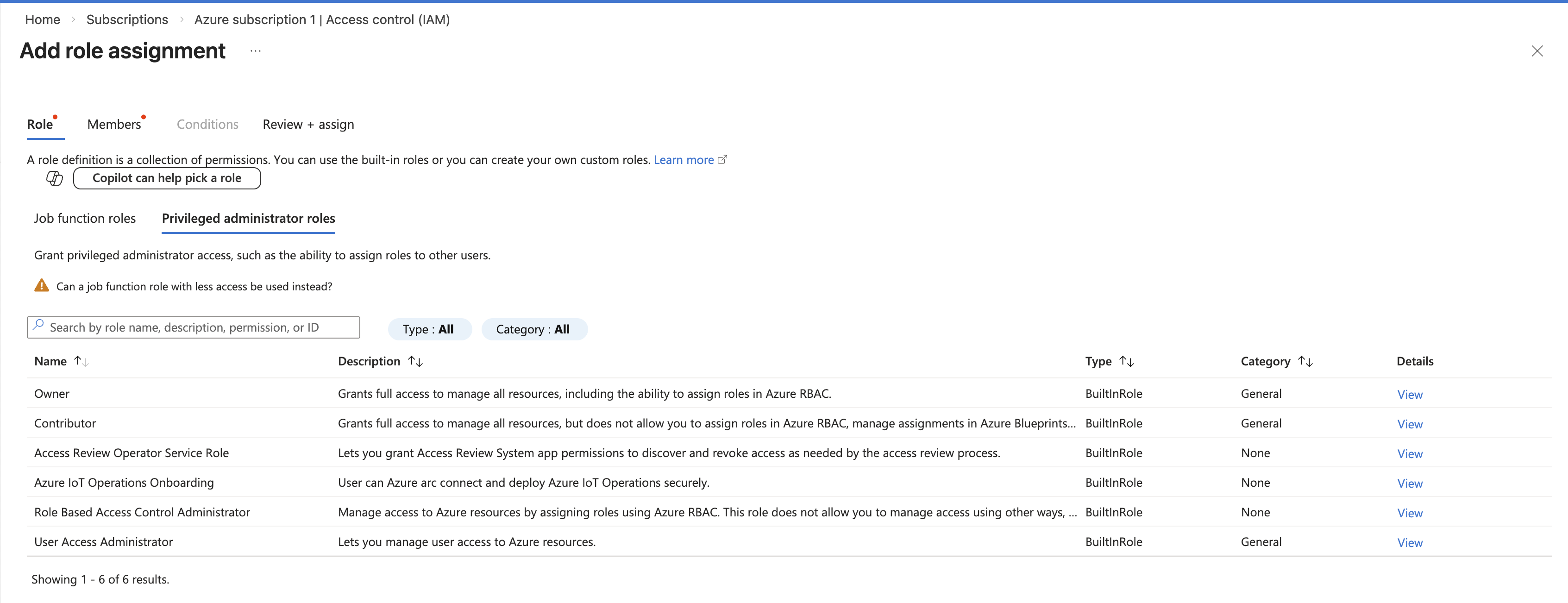
For specific workloads, Azure provides more granular roles like Virtual Machine Contributor, App Service Contributor, and Storage Blob Data Owner. These allow you to follow the principle of least privilege more closely.
Scope
Scope is the "where" in RBAC. It's the level at which a role assignment applies. Azure supports role assignments at several levels:
- Root - Applies to all resources in the tenant
- Management Group - Applies to all subscriptions within the group
- Subscription - Applies to all resource groups and resources within the subscription
- Resource Group - Applies to all resources within the group
- Resource - Applies to a single resource
An important concept to understand is that role assignments are inherited downward. If you assign someone the Contributor role at the subscription level, they have Contributor access to all resource groups and resources within that subscription.
Best Practices for RBAC
Over the course of managing access for a startup, I've learned several best practices:
-
Use Groups, Not Individual Assignments
Always assign roles to Azure AD groups rather than individual users. This makes it easier to manage permissions as people move between teams or leave the organisation. It also creates an auditable record of who should have access.
-
Follow the Principle of Least Privilege
Give users only the permissions they need to do their job. It's tempting to assign Owner or Contributor to everyone, but this creates unnecessary risk. A developer doesn't need to delete resource groups, and a support technician doesn't need to modify production configurations.
-
Use Resource Groups to Organize Permissions
Create resource groups based on teams or projects, and assign roles at the resource group level rather than at individual resources. This makes permissions easier to understand and manage.
-
Regularly Review Access
Schedule quarterly reviews of who has access to what. In a startup, people's roles change frequently. Revoking access for people who no longer need it reduces your attack surface.
-
Use Managed Identities for Applications
If you have applications or automation that need to access Azure resources, use managed identities rather than storing credentials. Managed identities eliminate the need to manage secrets and automatically rotate credentials.
-
Consider Using Privileged Identity Management (PIM)
For highly sensitive roles like Owner or User Access Administrator, consider using Azure AD Privileged Identity Management (PIM). PIM requires users to request and justify access, and access is temporary. This adds an extra layer of security for sensitive operations.
Conclusion
RBAC is one of the most important security controls you can implement in Azure. It's not complicated, but it does require thoughtful planning. Start with the principle of least privilege, use groups instead of individual assignments, and review access regularly. Your future self (and your security team) will thank you.
The good news is that Azure makes RBAC straightforward. Once you understand the three components (security principal, role definition, and scope), you'll find it's an elegant way to manage access as your organisation grows.